> ## Documentation Index
> Fetch the complete documentation index at: https://docs.withterminal.com/llms.txt
> Use this file to discover all available pages before exploring further.
# Deleting Connections
> Permanently delete a connection and all of its associated data from Terminal.
Deleting a connection permanently removes all data Terminal has synced for it. This action cannot be undone, and is the right choice when you need the data itself to be gone — for example, when a customer requests data deletion, or when you're cleaning up test and duplicate connections whose history you don't want to keep.
## What gets deleted
Terminal removes all data which was synced for the connection: entities, historical data, and time-series data.
Terminal also removes sensitive and operational data: provider credentials, sync and issue history, and any filters configured on the connection.
Terminal retains the connection record so you can confirm the deletion via [List Connections](/api-reference/connections/list-connections) and reconcile references on your side.
## Deletion lifecycle
Once deletion is requested, the connection moves through three statuses:
| Status | Meaning |
| ------------------ | --------------------------------------------------------------------------------------- |
| `pending_deletion` | Deletion has been requested. Data flow has stopped. The request can still be cancelled. |
| `deleting` | Terminal is actively removing data. This step is irreversible. |
| `deleted` | All data has been removed. |
A **24-hour grace period** applies before deletion starts. As soon as deletion is requested, the connection moves to the `pending_deletion` status and Terminal stops syncing it, excludes it from data delivery, and stops emitting data webhooks for it — ensuring that no further data is ingested or delivered during the grace period. The request can still be cancelled at any point before the grace period ends. After that, the connection transitions to the `deleting` status, data removal begins, and the process can no longer be stopped.
Deletion is expected to complete within 48 hours of the original request.
## Delete via the dashboard
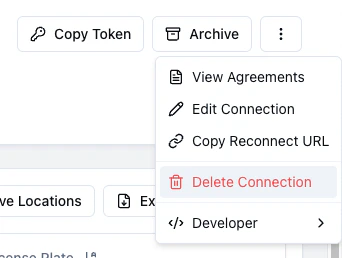
From the [Terminal Dashboard](https://dashboard.withterminal.com), open the connection, click the triple-dot menu in the header, and choose **Delete Connection**.
The **Delete Connection** action is restricted to Dashboard members with the
**admin** role. Members with other roles will not see it in the menu.
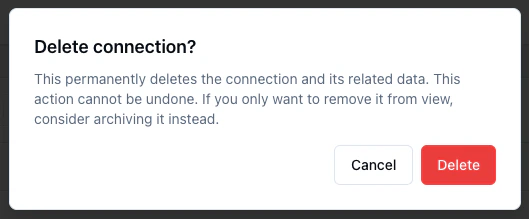
 A confirmation modal explains the consequences. Because deletion is an irreversible action, it requires explicit confirmation.
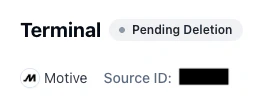
Once confirmed, the connection moves to **Pending Deletion** for the 24-hour grace period.
A confirmation modal explains the consequences. Because deletion is an irreversible action, it requires explicit confirmation.
Once confirmed, the connection moves to **Pending Deletion** for the 24-hour grace period.
 Connections in `deleting` or `deleted` status will no longer be visible in the dashboard.
## Delete via the API
To delete a connection programmatically, call [Delete Current Connection](/api-reference/connections/delete-current-connection) with your Terminal secret key and the connection token for the connection you want to delete.
```bash theme={null}
curl -X DELETE https://api.withterminal.com/tsp/v1/connections/current \
-H "Authorization: Bearer $TERMINAL_SECRET_KEY" \
-H "Connection-Token: $CONNECTION_TOKEN"
```
Any API key can request deletion of a connection.
The endpoint returns `202 Accepted` and updates the connection status to `pending_deletion`. Terminal emits a [`connection.pending_deletion`](/api-reference/webhook-events/connection-pending-deletion) webhook when deletion is requested and a [`connection.deleted`](/api-reference/webhook-events/connection-deleted) webhook after deletion completes.
## Cancelling a pending deletion
While a connection is in the `pending_deletion` status, set it back to `connected` or `archived` via [Update Current Connection](/api-reference/connections/update-current-connection) to cancel the deletion. Once the connection transitions to the `deleting` status, cancellation is no longer possible.
## Archive vs delete
Archiving and deleting are both ways to wind down a connection, but they solve different problems:
| Action | What happens to data | Reversible? | Use when |
| ----------- | -------------------- | ---------------------------- | ----------------------------------------------------------------------- |
| **Archive** | Kept | Yes, at any time | You want to stop syncing a connection but keep its history available. |
| **Delete** | Permanently removed | Only during the grace period | You need the data gone — for example, a customer data deletion request. |
If you're not sure, archive first. You can always delete later.
Connections in `deleting` or `deleted` status will no longer be visible in the dashboard.
## Delete via the API
To delete a connection programmatically, call [Delete Current Connection](/api-reference/connections/delete-current-connection) with your Terminal secret key and the connection token for the connection you want to delete.
```bash theme={null}
curl -X DELETE https://api.withterminal.com/tsp/v1/connections/current \
-H "Authorization: Bearer $TERMINAL_SECRET_KEY" \
-H "Connection-Token: $CONNECTION_TOKEN"
```
Any API key can request deletion of a connection.
The endpoint returns `202 Accepted` and updates the connection status to `pending_deletion`. Terminal emits a [`connection.pending_deletion`](/api-reference/webhook-events/connection-pending-deletion) webhook when deletion is requested and a [`connection.deleted`](/api-reference/webhook-events/connection-deleted) webhook after deletion completes.
## Cancelling a pending deletion
While a connection is in the `pending_deletion` status, set it back to `connected` or `archived` via [Update Current Connection](/api-reference/connections/update-current-connection) to cancel the deletion. Once the connection transitions to the `deleting` status, cancellation is no longer possible.
## Archive vs delete
Archiving and deleting are both ways to wind down a connection, but they solve different problems:
| Action | What happens to data | Reversible? | Use when |
| ----------- | -------------------- | ---------------------------- | ----------------------------------------------------------------------- |
| **Archive** | Kept | Yes, at any time | You want to stop syncing a connection but keep its history available. |
| **Delete** | Permanently removed | Only during the grace period | You need the data gone — for example, a customer data deletion request. |
If you're not sure, archive first. You can always delete later.