Overview
Telematics providers report measurements in different units. One provider sends odometer readings in miles, another in meters, and another lets each fleet choose. Terminal normalizes every measurement to a single standard unit, so a value means the same thing regardless of which provider it came from. The API always returns these standard units. There are no query parameters or settings that change them. Convert values in your own application if you need to show other units.Standard Units
Terminal uses metric units for distance, speed, volume, and temperature. Each measurement type below is a named schema in the API reference, so the unit is part of the field’s type.Pressure is the one exception to metric: Terminal returns pressure in psi.
Converting Values
If your users expect imperial units, convert the API values in your application:
The Dashboard uses the same 1.609344 factor for miles and mph.
For example, a trip with
"distance": 160.93 is 100 miles, and a location with "speed": 104.61 is 65 mph.
Display Units in the Dashboard
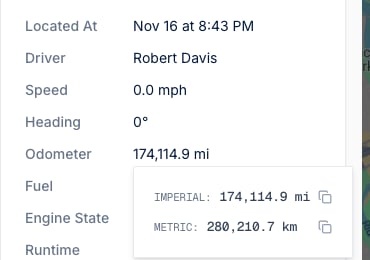
The Terminal Dashboard can show distance and speed in metric or imperial units. This is a personal setting: each Dashboard user picks their own units, and the choice follows them across applications and devices. The setting only changes how values are displayed. It has no effect on API responses, webhooks, or data delivered to destinations, which always use the standard units above.How to Change Your Units
1
Open your user profile
Click your name in the bottom-left corner of the Dashboard, then select User Profile. You can also open it from Settings > User Profile.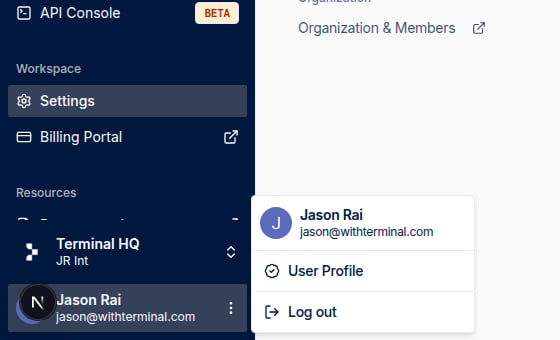
2
Go to the Units page
Select Units in the menu on the left.
3
Choose your units
Under Distance and speed, select Metric (km, km/h) or Imperial (mi, mph). The change saves immediately.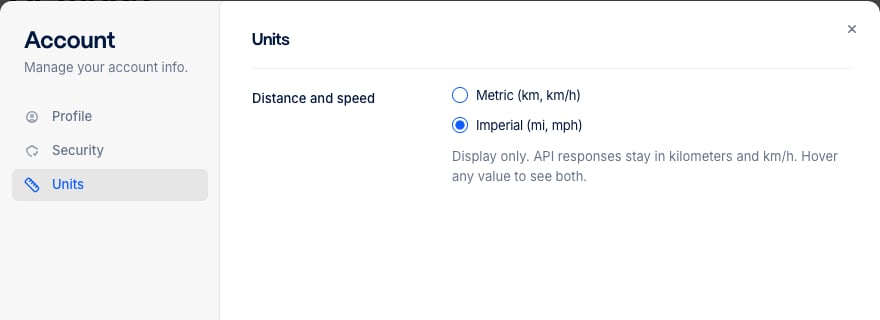
Where the Setting Applies
The Dashboard uses your preference for distance and speed wherever it shows them, including:- Vehicle and trailer live locations and maps
- Vehicle history: trips, trip start and end markers, and the event sidebar
- Safety event details, such as average speed, maximum speed, and the road speed limit