

What gets deleted
Terminal removes all data which was synced for the connection: entities, historical data, and time-series data. Terminal also removes sensitive and operational data: provider credentials, sync and issue history, and any filters configured on the connection. Terminal retains the connection record so you can confirm the deletion via List Connections and reconcile references on your side. Deleted connection records includedeletedAt, the time deletion completed.
Deletion lifecycle
Once deletion is requested, the connection moves through three statuses:
A 24-hour grace period applies before deletion starts. As soon as deletion is requested, the connection moves to the
pending_deletion status and Terminal stops syncing it, excludes it from data delivery, and stops emitting data webhooks for it — ensuring that no further data is ingested or delivered during the grace period. The connection token also cannot be used to read stored data (for example List Vehicles or historical locations). Get, update, and delete current connection remain available so you can inspect status or cancel during the grace period. The request can still be cancelled at any point before the grace period ends. After that, the connection transitions to the deleting status, data removal begins, and the process can no longer be stopped.
Deletion is expected to complete within 48 hours of the original request.
Delete via the dashboard
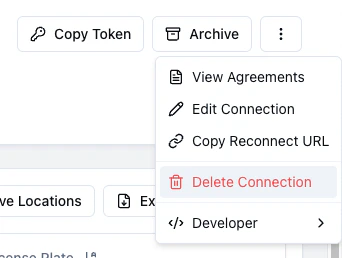
From the Terminal Dashboard, open the connection, click the triple-dot menu in the header, and choose Delete Connection.The Delete Connection action is restricted to Dashboard members with the
admin role. Members with other roles will not see it in the menu.
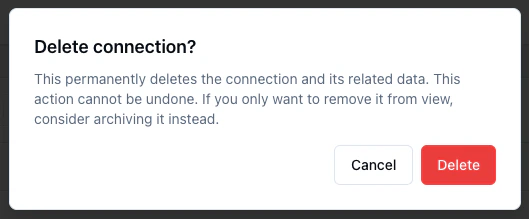

deleting or deleted status will no longer be visible in the dashboard.
Delete via the API
To delete a connection programmatically, call Delete Current Connection with your Terminal secret key and the connection token for the connection you want to delete.Any API key can request deletion of a connection.
202 Accepted and updates the connection status to pending_deletion. Terminal emits a connection.pending_deletion webhook when deletion is requested and a connection.deleted webhook after deletion completes.
Cancelling a pending deletion
While a connection is in thepending_deletion status, set it back to connected or archived via Update Current Connection to cancel the deletion. Once the connection transitions to the deleting status, cancellation is no longer possible.
Archive vs delete
Archiving and deleting are both ways to wind down a connection, but they solve different problems:
If you’re not sure, archive first. You can always delete later.